
EcoFlow Solar Charging Stuck at 8A? What It Means and What to Check
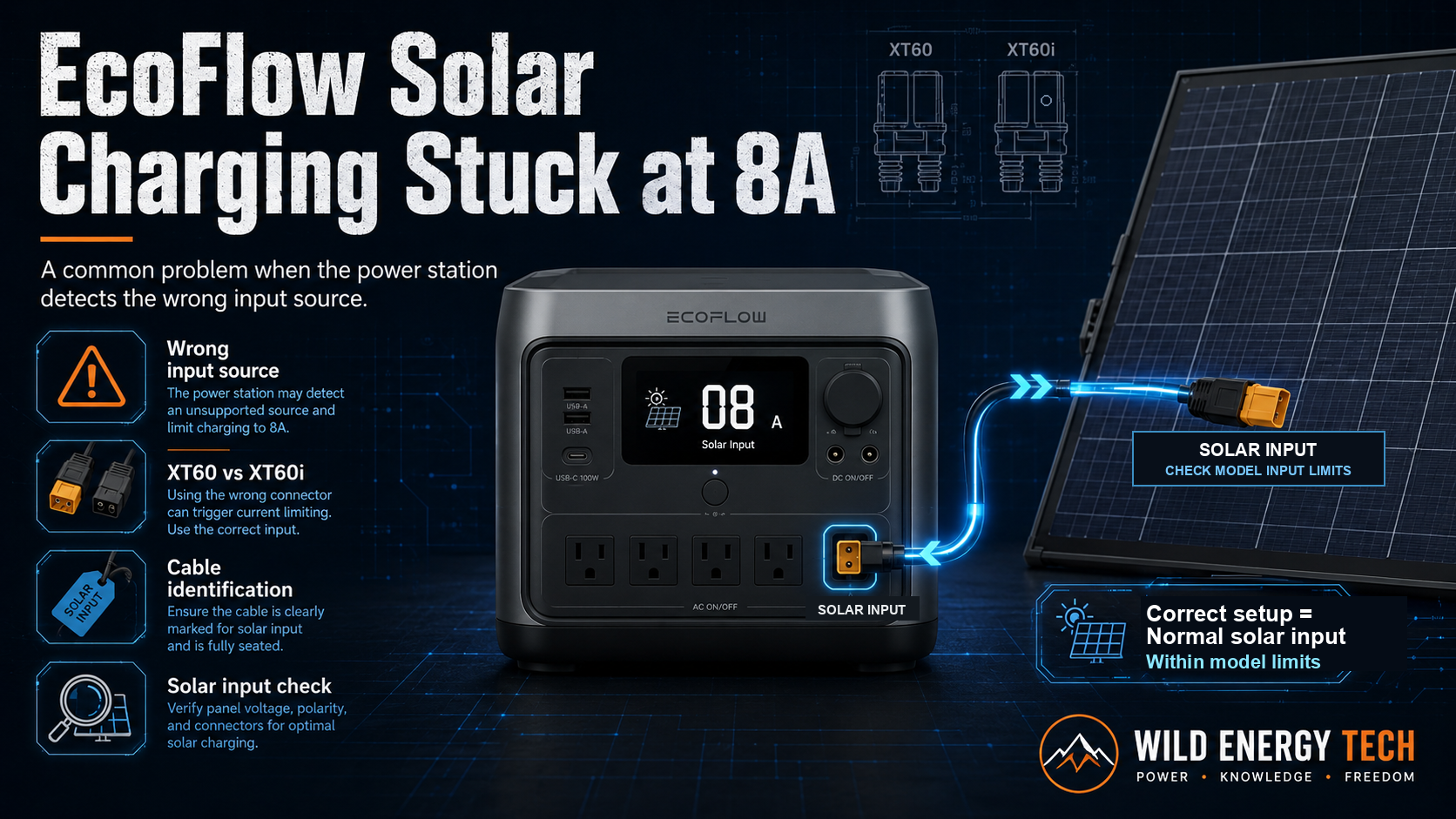
EcoFlow solar charging stuck at 8A is a common problem when the power station detects the wrong input source. Instead of reading your solar panels as a high-current solar array, the EcoFlow unit may treat the connection like a lower-current DC input and limit the input current for safety.
This usually happens because of the difference between a standard XT60 connector and a proper XT60i solar charging cable. Even if you connect a larger solar array in strong sunlight, the input power can stay much lower than expected when the cable does not send the correct identification signal to the power station.
In this guide, you will learn why EcoFlow solar charging can get stuck at 8A, how the XT60i connector works, and what you should check before replacing panels, adapters, or cables. Note: 8A behaviour is model-specific. Not every EcoFlow unit behaves the same way, and EcoFlow may update firmware, accessory listings or model behaviour over time. Always check the official EcoFlow manual or cable listing for your exact model before changing cables or panels.
Quick Diagnostic
EcoFlow Stuck at 8A: Three Things to Check First
On some EcoFlow models, the 8A limit is caused by input source detection — not a faulty panel or weak sunlight. Use this quick reference before replacing any hardware. Note: behaviour is model-specific. Always check the official EcoFlow manual for your exact unit.
Check 1
Cable Type
Is your cable a standard XT60 or a proper XT60i solar charging cable? A standard XT60 may not send the identification signal some EcoFlow models expect for full solar input behaviour.
Check 2
EcoFlow Model
Does your exact EcoFlow model require a Solar to XT60 or Solar to XT60i cable? Older RIVER and DELTA series often use XT60. Newer RIVER 2 and DELTA 2 series often use XT60i. Confirm against the official manual.
Check 3
Panel Compatibility
After confirming the cable, check the solar panel Voc, Vmp, current and wattage against the power station solar input limits. The cable fix only helps if the panel setup is also compatible.
| Cable or connector type | Contact behaviour | What the unit may detect | Possible charging result |
|---|---|---|---|
| Standard XT60 | Two main contacts only | May be treated as a lower-current DC input | Input may be limited on some models |
| Generic or unbranded solar cable | May lack the XT60i identification contact | May not be recognised as the intended solar input | Can underperform on models that check for identification |
| EcoFlow-compatible XT60i solar cable | Includes the identification contact | May be detected as solar input | Allows the model’s normal solar input behaviour, when other conditions are also met |
A reading near 8A is a possible symptom of car-charging-mode detection, not confirmation of it. Sunlight, panel setup, connections, and model-specific input limits can also produce a similar reading — see the troubleshooting steps below.
The Technical Reason: XT60 vs XT60i
Some EcoFlow power stations use an XT60i-style input for solar charging. This connector looks very similar to a standard XT60 connector, but it can include an additional identification contact.
A standard XT60 connector normally has two main contacts: positive and negative. An XT60i connector can include a third contact that helps the power station identify the input source or cable type.
This difference matters because a cable that fits physically may not always be detected as the correct solar charging cable. For a side-by-side look at these connectors, see the visual guide to XT60, XT60i, MC4, and common power-station connectors.
Related guide: EcoFlow XT60 vs XT60i: Which Cable Do You Need?
The 8A Input Limit Behaviour
When a cable is plugged into the power station, the unit may check how the input source is identified. If the cable does not provide the expected XT60i-style identification behaviour, the power station may treat the source more conservatively and limit the current.
- Standard XT60 cable: The power station may not detect the cable as a proper solar input cable, which can lead to an 8A-style current limit on some models.
- XT60i solar cable: A correctly wired XT60i solar charging cable can help the power station identify the source as solar input and allow the model’s proper solar input behaviour.
The exact current limit depends on the EcoFlow model, firmware, input settings and official specification. Always check the manual for your exact unit.
EcoFlow’s own product page for its car charging cable states, as retrieved on 2026-07-23: “The XT60 connector is a unique feature that automatically detects the current, distinguishing between car charging and solar input, with a maximum current limit of 8A for car charging.” (Source: EcoFlow Car Charging Cable — official product page.) This confirms that EcoFlow designs at least some of its XT60 connectors to distinguish car-charging sources from solar input, and that 8A is an officially documented limit in that context. It does not establish that every EcoFlow model uses identical internal detection logic, and EcoFlow does not publicly document every detail of how each model’s identification circuit works. A solar reading stuck near 8A is a symptom consistent with car-charging-mode detection — on its own, it is not proof that a specific cable is miswired or mislabeled.
Documented vs. community-reported information
- Official EcoFlow statement: the XT60 connector on EcoFlow’s car charging cable automatically detects current and distinguishes car charging from solar input, with an 8A limit for car charging.
- Connector-manufacturer specification: XT60i connectors are documented by connector manufacturers as adding a third, smaller identification contact alongside the two main power contacts of a standard XT60.
- General electrical principle: power electronics commonly default to a lower, safer current limit when a source cannot be positively identified.
- Community-reported behaviour: some users report the identification contact is used to signal solar-source presence on specific models. EcoFlow has not published the exact mechanism for every model, so treat this as anecdotal, not confirmed specification.
How the Power Station Identifies the Source
The key issue is input identification. A proper solar charging cable may tell the power station that the connected source is a solar panel array rather than another DC input source.
Without the expected cable identification, the power station may choose a safer lower-current mode. This is why changing from a standard XT60 cable to a proper XT60i solar charging cable can sometimes increase solar input immediately.
This does not mean every low solar input problem is caused by the cable. Weak sunlight, bad panel angle, shade, wrong voltage, incorrect polarity, or power station limits can also reduce charging speed.
Related guide: Why Solar Charging Is Slow on Portable Power Stations
Six Steps to Diagnose an EcoFlow Solar Input Stuck at 8A
If your EcoFlow solar charging is stuck near 8A, work through these steps in order before buying a new cable. Most take only a few minutes and can rule out causes that have nothing to do with the cable at all.
Step 1: Confirm 8A Is Actually Unexpected
Check your exact EcoFlow model’s documented maximum solar-input current in its official manual, and compare it against what your panel setup can realistically deliver. If your model’s documented behaviour already matches roughly 8A under your current conditions, this may not be a fault at all — it may be the expected, documented behaviour for that combination of model, cable, and panel.
Step 2: Rule Out Environmental and Positioning Causes
Before touching any hardware, rule out the most common non-cable causes of low solar input: weak or indirect sunlight, cloud cover, partial shading, a poor tilt angle or orientation relative to the sun, and high panel temperature, which can reduce output. Time of day matters too, since solar input naturally drops well before and after solar noon. These factors cannot be predicted with a specific output figure — they simply need to be checked and, where possible, corrected before moving on.
Step 3: Inspect the Physical Connection
With the system powered down, visually inspect the connector for loose connections, damaged insulation, bent or contaminated contacts, incorrect polarity, or an MC4-to-XT60/XT60i adapter that is not fully seated. Do not open, rewire, or otherwise modify the connector or cable — this is a visual and physical check only, not a repair.
Step 4: Confirm the Exact Cable and Source Type
Identify whether your cable is a standard XT60 cable or a proper XT60i solar charging cable, and confirm the exact model and regional variant of your EcoFlow unit, since cable requirements can differ between models. Check whether the cable is actually intended for solar charging rather than car charging, and confirm against EcoFlow’s current official documentation rather than assumptions based on connector shape alone. If you are not sure which cable your specific EcoFlow model needs, look up your exact EcoFlow model in the complete compatibility directory before buying a replacement.
Step 5: Verify Electrical Compatibility
Check the solar panel’s Voc (open-circuit voltage) and, where useful, Vmp (voltage at maximum power) against your power station’s maximum solar input voltage, current limit, and wattage limit. If panels are wired in series or parallel, confirm the combined voltage or current still falls within the station’s rated input range. Panel voltage also rises in cold weather, which can push a borderline setup outside the station’s input limits even if it worked fine on a warmer day.
Step 6: Consider Firmware and Display Behaviour
A displayed current value alone does not identify the cause of a limit — it can reflect the cable’s identification signal, current firmware behaviour, how the unit reports input on its display, the battery’s state of charge, or other model-specific control logic. If you have checked your documented input limits and your physical setup and the reading still seems wrong, contact EcoFlow support with your exact model and firmware version rather than guessing further.
Related guides: MC4 to XT60i vs XT60 Cable Guide and How to Check if a Solar Panel Is Compatible With a Portable Power Station.
Using the wrong EcoFlow solar cable can limit charging
If your EcoFlow solar input is stuck near 8A, using an XT60 cable on a model that expects XT60i can hold the current at the lower limit. Confirm which connector your model needs, then check the official EcoFlow cable below.
Affiliate disclosure: The links below are affiliate links. If you buy through them, I may earn a commission at no extra cost to you.
Simplified connector specification
- Two main power contacts
- No additional identification contact
Official EcoFlow XT60 Solar Charging Cable
For EcoFlow models that use the standard 2-contact XT60 solar input.
Check the Official XT60 CableSimplified connector specification
- Two main power contacts
- One additional identification contact
- The additional contact does not carry extra charging power
Official EcoFlow XT60i Solar Charging Cable
For compatible EcoFlow models that use the 3-contact XT60i solar input, with its extra signal pin.
Check the Official XT60i CableConfirm your exact EcoFlow model, input label, connector type, and official manual before ordering.
Safety Warning: Do Not “Hack” the Cable
Some DIY advice suggests modifying or bridging cable pins manually. Do not do this. Do not bridge or short the connector’s identification contact, modify or rewire the connector, or attempt to imitate a solar-source signal to defeat the power station’s current limit. These actions are not safe under any level of technical experience, and this guide does not provide instructions for performing them.
If a cable is wired incorrectly, used with the wrong source, or forced into the wrong identification mode, it may create overheating risk, damage equipment, or void warranty coverage.
The safer approach is to use a properly specified XT60i solar charging cable designed for your exact EcoFlow model and solar panel setup.
For a broader overview of adapters, connector types, and testing tools, visit the Hardware Vault.
Quick Checklist Before You Replace Anything
- Confirm your exact EcoFlow model.
- Check whether your model expects XT60 or XT60i solar input behaviour.
- Check whether your cable is a proper XT60i solar charging cable.
- Check the solar panel Voc and Vmp values.
- Check the power station’s maximum solar input voltage.
- Check polarity before connecting third-party panels or adapters.
- Check sunlight, panel angle, shade and cable length.
- Use a properly rated cable from a trustworthy seller.
Related guide: Portable Power Station Compatibility Checklist
FAQ — EcoFlow Solar Charging Stuck at 8A
Why is my EcoFlow solar input limited to around 8A?
The cable may not be identified as the correct solar charging cable. On some models, using a standard XT60 cable instead of a proper XT60i solar cable can cause lower-current input behaviour.
Does this always mean the cable is wrong?
No. Slow or limited solar input can also come from weak sunlight, shade, wrong panel angle, voltage mismatch, battery state of charge, cable losses or input settings.
Is there a firmware fix for the 8A limit?
Usually this behaviour is related to hardware/cable identification, not just software. Check your exact model manual and use the correct solar charging cable.
Can I modify a standard XT60 cable myself?
It is safer to avoid DIY cable modifications. Use a properly specified XT60i solar charging cable designed for your model and setup.
Final Recommendation
If your EcoFlow solar charging is stuck at 8A, check the cable first. A standard XT60 cable may physically fit but may not provide the same identification behaviour as a proper XT60i solar charging cable.
After that, verify the rest of the setup: solar panel voltage, current, wattage, connector type, polarity, sunlight, panel angle and cable quality.
The safest fix is not to force or modify cables. Use the correct cable for your exact EcoFlow model and confirm the solar panel is within the official input limits.
Related Wild Energy Tech Guides
This guide focuses on diagnosing the 8A symptom itself. For the underlying connector difference, see the XT60 vs XT60i comparison guide below; to check which connector your specific EcoFlow model uses, see the model directory. These and other related guides may also help:
EcoFlow XT60 vs XT60i: Which Cable Do You Need?
EcoFlow Model Directory — Find Whether Your Model Uses XT60 or XT60i
MC4 to XT60i vs XT60 Cable Guide
Why Solar Charging Is Slow on Portable Power Stations
How to Check if a Solar Panel Is Compatible With a Portable Power Station
Portable Power Station Hardware Vault
Visual Connector Guide — identify MC4, XT60 and XT60i connector types