
Solar Panel Voc vs Vmp Explained for Portable Power Stations

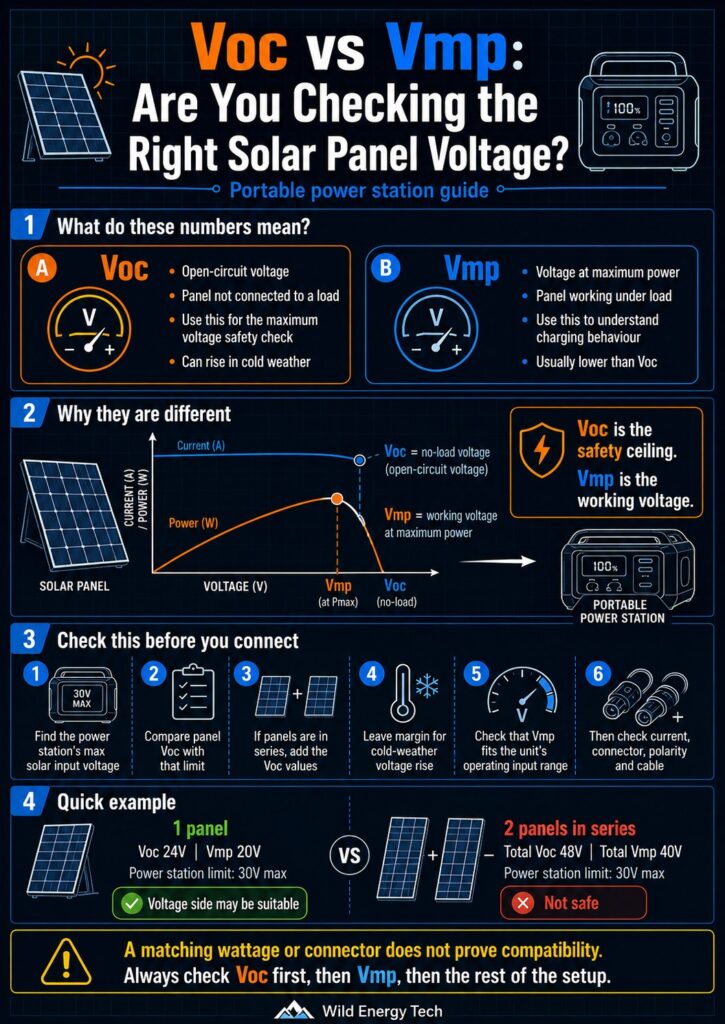
Voc vs Vmp solar panel voltage infographic showing how to compare open-circuit voltage, working voltage and portable power station input limits before connecting solar panels
Visual guide explaining the difference between Voc and Vmp, why Voc matters for safety, and how to compare solar panel voltage with portable power station input limits before connecting.

Your solar panel Voc vs Vmp figures look similar but answer different questions. Checking only one of them — or checking only watts — can lead to a compatibility mistake before anything is connected.

This is where many compatibility mistakes begin. A solar panel label may show Voc, Vmp, watts, current and connector information — but not all of those numbers mean the same thing.

Voc is the number you check first for safety. It tells you the open-circuit voltage the power station may see before the panel is working under load. Vmp is the working voltage the panel normally uses when it is producing usable power.

If you only look at Vmp, the panel may look compatible when the Voc is actually too high. If you only look at watts, you may miss the real voltage limit completely.

This guide shows you how to read Voc and Vmp, which number matters first, and what you should check before connecting a solar panel, adapter or cable to your portable power station.

Safety note: Do not connect a solar panel just because the plug fits or the wattage looks right. First, compare the panel’s Voc with your power station’s maximum solar input voltage. If the panel Voc — or the total series Voc — is above the limit, do not connect it.

Quick Answer: Which Voltage Should You Check First?

If you are trying to decide whether a solar panel is safe for your portable power station, check Voc first.

  • Voc means open-circuit voltage. It is the panel voltage when the panel is not connected to a load.
  • Vmp means voltage at maximum power. It is the working voltage when the panel is producing usable power.
  • Voc is the safety number you compare with the power station’s maximum solar input voltage.
  • Vmp helps you understand normal charging behaviour once the panel is working.

Think of it this way: Voc tells you whether the setup may be safe to connect. Vmp helps explain how the setup may behave while charging.

Technical Display Case

Voc vs Vmp: Which Solar Panel Number Really Matters?

Both numbers matter, but they do not answer the same question.

Voc answers the safety question: “Can this panel send more voltage than my power station can accept?”

Vmp answers the working question: “Is this panel likely to operate inside the power station’s normal charging range?”

Before you connect anything, do not start with the connector shape, the adapter photo, or the wattage printed on the box. Start with the voltage numbers.

Safety Ceiling

Voc

  • Means open-circuit voltage.
  • Measured when the panel is not connected to a load.
  • Used to check the power station’s maximum input voltage.
  • Can rise in cold weather, so margin matters.

Operating Voltage

Vmp

  • Means voltage at maximum power.
  • Measured when the panel is producing useful power.
  • Helps explain normal charging behaviour.
  • Does not replace the Voc safety check.

Safe Compatibility Rule

  • Use Voc for safety: the panel’s Voc must stay below the power station’s maximum solar input voltage.
  • Use Vmp for operation: Vmp helps estimate how the panel behaves while charging.
  • Check cold-weather margin: low temperatures can increase Voc, so always check the panel datasheet.
Term Meaning Used for Main risk
Voc Open-circuit voltage Checking maximum input voltage Exceeding the power station’s voltage limit
Vmp Voltage at maximum power Understanding normal charging operation Mistaking operating voltage for the safety ceiling
Simple rule: check Voc first for safety, then check Vmp for charging behaviour.

What Is Solar Panel Voc?

Voc stands for open-circuit voltage. It is the voltage a solar panel can produce when it is exposed to light but not connected to a power station, battery or charge controller.

This is why Voc matters before you plug anything in. When the panel is open and not under load, the voltage can be higher than the voltage you see during normal charging.

If your power station has a maximum solar input voltage of 30V, and your panel has a Voc of 42V, that is not a safe match for that input. The connector may fit. The wattage may look reasonable. But the voltage is already above the limit.

So before you think about adapters, cables or charging speed, ask this first: Is the panel Voc below the power station’s maximum solar input voltage?

What Is Solar Panel Vmp?

Vmp stands for voltage at maximum power. It is the voltage at which the panel normally produces its best useful power under test conditions.

In practical terms, Vmp helps you understand how the panel behaves while charging. If the power station needs a certain working voltage range, Vmp helps show whether the panel is likely to operate inside that range.

But this is the mistake many users make: they see a Vmp value that looks safe and forget to check Voc.

Vmp is usually lower than Voc. That means a panel can have a working voltage that looks acceptable, while its open-circuit voltage is still too high for the power station.

Use Vmp to understand charging behaviour. Do not use Vmp as the maximum voltage safety check.

Voc vs Vmp: Simple Comparison

If you are looking at a solar panel label and wondering which number to trust, use this simple comparison:

TermMeaningWhen it mattersHow to use it
VocOpen-circuit voltageBefore connectingCompare with the power station’s maximum solar input voltage
VmpVoltage at maximum powerDuring normal chargingCheck whether it fits the power station’s operating input range
IscShort-circuit currentWhen checking current limits and protectionUse as a maximum current reference
ImpCurrent at maximum powerDuring normal operationUse with Vmp to understand panel output under load

The main point is simple: Voc protects the power station from too much voltage. Vmp helps explain how the panel works while charging.

Why Voc Matters Most for Safety

Voc matters because it tells you the highest voltage your power station may see from the solar panel or panel array before the panel is working under load.

This is the number you compare with the power station’s maximum solar input voltage.

For example, if your power station accepts a maximum solar input of 30V and your panel has a Voc of 42V, do not connect that panel to that input. The problem is not the wattage. The problem is voltage.

This becomes even more important with panels in series. Series wiring adds voltage. Two panels with 24V Voc each can become about 48V Voc before cold-weather adjustment.

Cold weather can also increase open-circuit voltage. Cold temperatures can increase a solar panel’s open-circuit voltage (see PVEducation: Effect of Temperature for the underlying physics), so a setup that looks close to the limit in mild weather may become unsafe in colder conditions.

Before you connect, ask yourself: what is the total Voc, and is it still below the power station’s maximum input voltage with a safe margin?

Why Vmp Matters for Charging Behaviour

Vmp matters after the Voc safety check because it helps explain how the panel may behave during real charging.

If the Vmp is inside the power station’s operating input range, the panel has a better chance of charging normally under good conditions. If the Vmp is too low, the power station may not start charging, may show unstable watts, or may stop and start in weak light.

For example, if a power station works between 12V and 30V, a panel with Vmp around 20V may be inside the normal operating range. But you still need to check Voc, current, connector type, polarity and cable quality before connecting.

Voc helps you avoid an over-voltage mistake. Vmp helps you understand whether the charging behaviour makes sense.

How to Read Voc and Vmp on a Solar Panel Label

When you look at a solar panel label, do not focus only on the biggest number. The wattage may be easy to see, but the voltage numbers are what tell you whether the panel may be suitable for your power station.

Look for these values on the label or datasheet:

  • Voc or open-circuit voltage
  • Vmp or voltage at maximum power
  • Isc or short-circuit current
  • Imp or current at maximum power
  • Pmax or maximum rated power
  • Temperature coefficient of Voc, if available

If you cannot find Voc or Vmp, do not guess. Search for the official datasheet or choose a panel with complete electrical specifications.

A panel without clear voltage information is not a good choice for a careful portable power station setup.

How to Compare Voc and Vmp With a Portable Power Station

Before you connect a solar panel, compare the panel specifications with the solar input specifications of your exact power station model.

Use this order:

  1. Find the power station’s maximum solar input voltage. This is the limit you must not exceed.
  2. Compare the panel Voc with that limit. If Voc is above the limit, do not connect.
  3. If you are using panels in series, add the Voc values together. Series wiring increases voltage.
  4. Leave margin for cold-weather voltage rise. Cold conditions can increase open-circuit voltage.
  5. Check that Vmp fits the operating input range. This helps you understand normal charging behaviour.
  6. Then check current, wattage, connector type, polarity and cable rating. Voltage is only one part of compatibility.

Do not reverse this order. If the Voc check fails, the setup is not suitable for that input, even if everything else looks correct.

Related guide: How to Check if a Solar Panel Is Compatible With a Portable Power Station

Simple Example: Voc vs Vmp Compatibility Check

Imagine your portable power station accepts solar input from 12V to 30V, with a maximum solar input voltage of 30V.

Now imagine your solar panel has these specifications:

  • Voc: 24V
  • Vmp: 20V
  • Imp: 8A
  • Pmax: 160W

In this example, the panel Voc is below the 30V maximum input voltage. That is a good first sign.

The Vmp is also inside the 12V to 30V operating range, which suggests the panel may work normally from a voltage point of view.

But this still does not prove full compatibility. You still need to check current, wattage, connector type, polarity, adapter wiring and cable quality.

The voltage side may be suitable, but the full setup still needs to be checked.

What Happens to Voc and Vmp in Series?

Series wiring is where many voltage mistakes happen.

When you connect solar panels in series, the voltage adds together. That means the total Voc can rise quickly, even if each individual panel looks safe by itself.

For example, if each panel has:

  • Voc: 24V
  • Vmp: 20V

Two panels in series become approximately:

  • Total Voc: 48V
  • Total Vmp: 40V
  • Current: roughly the same as one panel

If your power station has a maximum solar input voltage of 30V, this series setup is not safe to connect.

Before connecting panels in series, always add the Voc values first. Do not use only the voltage of one panel.

Related guide: Series vs Parallel Solar Panels for Portable Power Stations

What Happens to Voc and Vmp in Parallel?

Parallel wiring behaves differently from series wiring.

When you connect panels in parallel, the voltage usually stays similar, but the current increases.

Using two panels with Voc 24V and Vmp 20V each:

  • Total Voc: stays around 24V
  • Total Vmp: stays around 20V
  • Total current: can increase

This may help keep voltage within the power station’s input range, but it does not mean the setup is automatically safe.

You still need to check the current limit, cable rating, branch connectors, adapter quality and polarity.

Parallel may reduce the voltage risk, but it can increase the current and cable load risk.

Common Mistakes With Voc and Vmp

Most solar compatibility mistakes do not happen because the user is careless. They happen because the wrong number gets checked first.

Checking Vmp but ignoring Voc

Vmp may look safe because it is usually lower than Voc. But Voc is the maximum voltage safety check. If you skip Voc, you may miss the number that can exceed the power station’s limit.

Using series wiring without adding Voc

In series, voltage adds. If you connect two panels, do not check only one panel’s Voc. Add the Voc values together before comparing with the power station limit.

Ignoring cold weather voltage rise

Cold temperatures can increase open-circuit voltage. If your setup is already close to the maximum input limit, cold weather can remove your safety margin.

Assuming wattage proves compatibility

A 200W panel is not automatically compatible with a 200W solar input. Voltage, current, connector type and polarity still matter.

Trusting adapter photos instead of specifications

A connector may look correct in a product photo, but compatibility depends on the full electrical setup. The plug fitting is not enough.

When You Should Not Connect the Solar Panel

Do not connect the solar panel or panel array if any of these checks fail:

  • The panel Voc is above the power station’s maximum solar input voltage.
  • The total series Voc is above the maximum input voltage.
  • You cannot find the panel Voc or Vmp values.
  • You cannot confirm the power station’s input voltage range.
  • The connector or adapter is unclear, loose, forced or poorly labelled.
  • You do not know the polarity.
  • The cable or adapter rating is not suitable for the current.

If you are not sure, stop and check the specifications first. Guessing is not worth the risk.

Final Recommendation

When comparing Voc vs Vmp for a portable power station, remember the order:

Check Voc first. Then check Vmp. Then check the rest of the setup.

Voc tells you whether the panel or panel array may exceed the power station’s maximum solar input voltage. Vmp helps you understand how the panel may behave during normal charging.

After that, continue with current, wattage, connector type, polarity, adapter quality and cable rating.

A safe solar setup is not based on one number alone. It comes from checking the full electrical path before you connect anything.

Related Wild Energy Tech Guides

If you are checking solar panel voltage, do not stop here. These guides help you check the rest of the setup before you connect cables, adapters or third-party panels:

How to Check if a Solar Panel Is Compatible With a Portable Power Station

Series vs Parallel Solar Panels for Portable Power Stations

Portable Power Station Not Detecting Solar Panel: What to Check First

How to Check Solar Panel Polarity Before Connecting to a Portable Power Station

Over-Paneling a Portable Power Station: What Happens When Solar Wattage Exceeds the Input Limit

Portable Power Station Compatibility Checklist

Portable Power Station Hardware Vault

Leave a Comment