
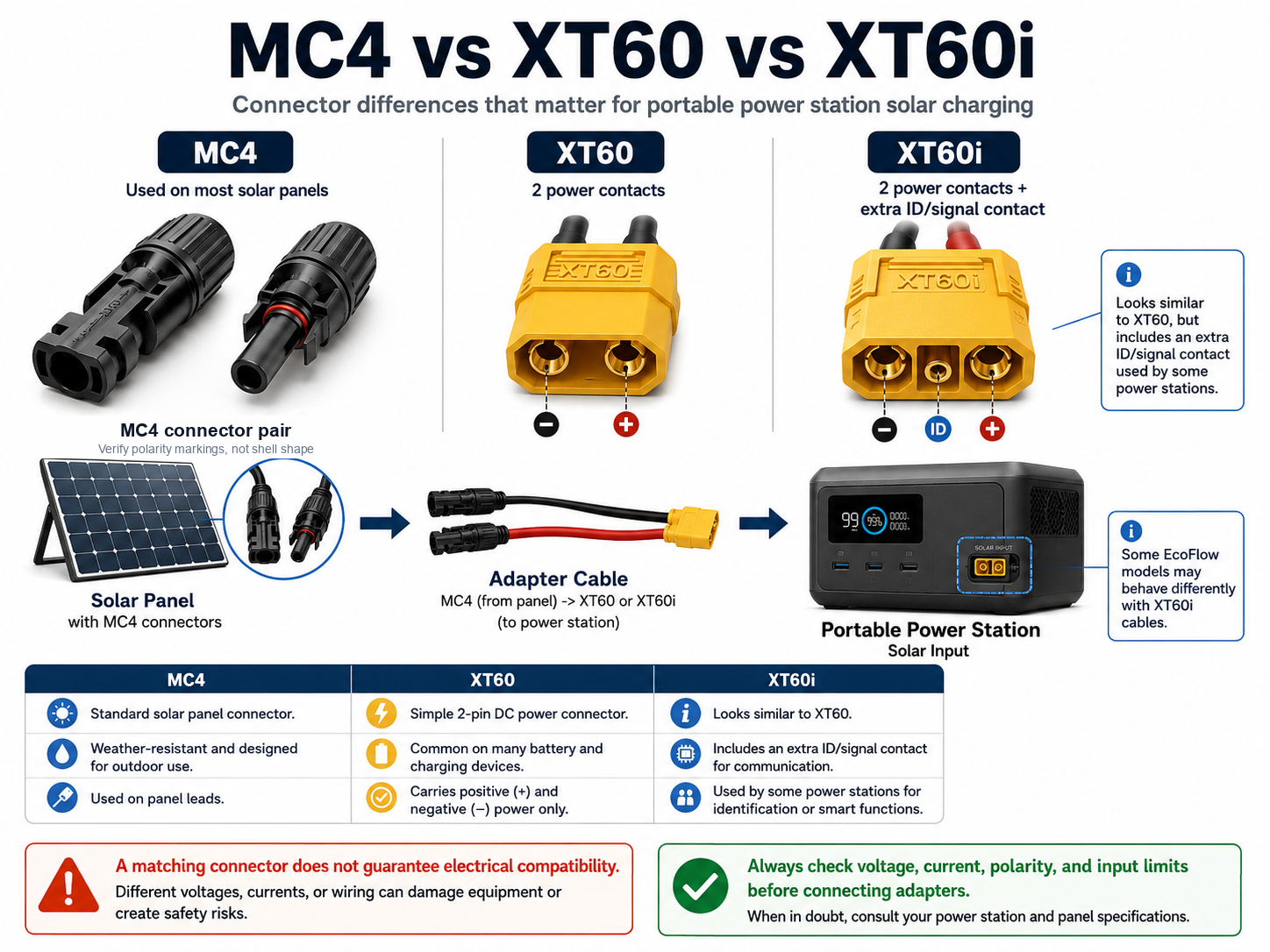
When you connect a solar panel to a portable power station, the MC4 connectors come from the panel and the XT60 or XT60i connector goes into the power station input. The adapter choice on the power station side affects whether the unit recognises solar input correctly, and some models may limit charging current if the wrong cable type is used.
Many users assume that if a connector fits, the cable is correct. But with solar charging, that is not always true.
For some portable power stations, especially some EcoFlow models, using the correct XT60i solar cable can be important for proper solar input recognition.
A matching connector does not guarantee electrical compatibility.
This guide explains the difference between MC4, XT60 and XT60i connectors, why this matters for portable power stations, and what you should check before buying or connecting a solar adapter.
What MC4, XT60 and XT60i Mean in a Solar Charging Setup
In a simple solar charging setup, each connector has a different role.
The solar panel usually has MC4 connectors. These are the positive and negative connectors coming from the solar panel.
The portable power station may use an XT60, XT60i, DC barrel or another input connector, depending on the brand and model.
So, in many setups, the cable path looks like this:
Solar panel → MC4 connectors → adapter cable → XT60 or XT60i input → portable power station
The important point is that the connector shape is only one part of the setup. The cable must also match the voltage, current, polarity and solar input limits of the power station.
Connector Display Case
MC4 vs XT60 vs XT60i: What Does Each Connector Do?
MC4, XT60 and XT60i connectors are used in different parts of a portable solar charging setup. MC4 is common on solar panel leads, while XT60 and XT60i are commonly used on the power station side. A cable can fit physically but still be wrong if the voltage, current, polarity, or model-specific input requirements do not match. For a closer visual look at these connectors, see the visual guide to XT60, XT60i, MC4, and common power-station connectors.
Solar Panel Side
MC4
- Common connector type on solar panel leads.
- Designed for outdoor solar cable connections.
- Polarity must still be confirmed before connecting.
- Usually needs an adapter cable to reach a power station input.
Standard DC Input
XT60
- Standard 2-contact DC power connector.
- Often used between adapters and portable power stations.
- Does not include the extra XT60i signal/contact function.
- May be correct for some models and wrong for others.
Solar Detection Input
XT60i
- Physically similar to XT60.
- Includes an additional signal/contact function.
- Used by some power stations to identify solar input correctly.
- Model-specific: always check the manual before buying.
Safe Adapter Rule
- Panel side: confirm MC4 polarity and panel specifications.
- Power station side: confirm whether your model expects XT60, XT60i, or another connector.
- Before connecting: check Voc, current rating, polarity, cable gauge, and the official device manual.
| Connector | Where it usually appears | Main purpose | Main risk |
|---|---|---|---|
| MC4 | Solar panel leads | Outdoor solar connection | Wrong polarity or incompatible adapter cable |
| XT60 | Power station input cable | Standard DC power transfer | May not signal solar input on some models |
| XT60i | Some solar input cables | DC power plus signal/contact function | May still be wrong if your model does not require it |
What Are MC4 Connectors?
MC4 connectors are commonly used on solar panels. They are usually found on the positive and negative leads coming from the panel.
They are designed to create a secure connection between solar panels, extension cables and adapters.
For portable power station users, MC4 connectors are important because many portable solar panels and rigid solar panels use them as the starting point of the solar charging cable.
However, MC4 connectors alone do not tell you whether the setup is compatible with your power station. You still need to check the power station input limits and the cable type on the other end.
What Are XT60 Connectors?
XT60 connectors are DC power connectors used in many battery and portable power setups.
In portable power stations, an XT60 connector may be used as the input connector for solar charging. This means the cable connects from the solar panel side, usually MC4, into the power station side, using XT60.
A normal XT60 connector has two main power contacts: positive and negative.
This works for many setups, but it does not mean every portable power station that accepts an XT60-style plug will behave the same way with every XT60 cable.
What Are XT60i Connectors?
XT60i connectors look similar to XT60 connectors, but they are not the same.
The main difference is that XT60i includes an extra contact pin. In some portable power station systems, this extra contact may help the power station identify the type of cable or charging source.
This identification contact does not carry extra charging power — it only helps compatible equipment identify the connected source. Not every power station interprets it the same way, so this is model-specific behaviour, not a universal rule.
This is especially important for some EcoFlow setups, where using the correct XT60i solar cable can affect how the power station recognises the solar input.
This is why a normal XT60 cable may physically fit, but may not always behave the same way as the correct XT60i solar charging cable.
MC4 to XT60i vs XT60: Main Differences
| Feature | XT60 | XT60i |
|---|---|---|
| Main use | DC power connection | DC power connection with an extra contact |
| Number of contacts | 2 main contacts | 2 main contacts plus an additional pin |
| Common portable power use | Older or simpler solar input cables | Some newer solar charging cables |
| Looks similar? | Yes | Yes |
| Always interchangeable? | No | No |
| Main risk | Cable may fit but not behave correctly | Still must match power station limits |
The key lesson is simple: do not choose a cable only because the connector shape looks right.
You need to check the full electrical requirements before buying or connecting any solar adapter.
Why This Matters for EcoFlow Solar Charging
EcoFlow power stations are a common example where XT60 and XT60i confusion can happen.
Some EcoFlow models use solar charging cables with XT60-style connectors, while others may require or recommend XT60i solar charging cables.
If the wrong cable is used, the power station may still charge, but the behaviour may not be ideal. In some cases, users may see lower charging current, unexpected limits or solar input that does not perform as expected.
EcoFlow’s own listing for its car charging cable states, as retrieved on 2026-07-23: “The XT60 connector is a unique feature that automatically detects the current, distinguishing between car charging and solar input, with a maximum current limit of 8A for car charging.” (Source: EcoFlow Car Charging Cable — official product page.) This confirms that at least some EcoFlow XT60 connectors are designed with automatic source detection and a documented current limit. It does not prove that every EcoFlow model uses identical internal detection logic. A connector mismatch is one possible reason for limited solar input — voltage, current, wattage, polarity and panel conditions can all produce a similar result, so each of those should also be checked.
If your EcoFlow solar charging seems stuck, limited or weaker than expected, do not assume the power station is faulty immediately.
Check the cable, adapter, solar panel voltage, current limit, panel wiring and connector type first.
If the cause is not connector-related, a wider range of environmental, panel, cable, battery, and input-limit factors can also slow solar charging — see why portable power station solar charging can be slower than expected for that broader troubleshooting picture, separate from the EcoFlow-specific source-detection behaviour covered next.
Related guide:
EcoFlow Solar Charging Stuck at 8A: What It Means and What to Check
EcoFlow Model Directory — Find Whether Your Model Uses XT60 or XT60i
Need the right EcoFlow solar charging cable?
If you are connecting MC4 solar panels to an EcoFlow, confirm whether your model uses XT60 or XT60i, then check the official EcoFlow cable before ordering.
Affiliate disclosure: The links below are affiliate links. If you buy through them, I may earn a commission at no extra cost to you.
Simplified connector specification
- Two main power contacts
- No additional identification contact
- Verify MC4 polarity and station input limits separately
Official EcoFlow XT60 Solar Charging Cable
For EcoFlow models that use the standard 2-contact XT60 solar input.
Check the Official XT60 CableSimplified connector specification
- Two main power contacts
- One additional identification contact
- The additional contact does not carry extra charging power
- Verify MC4 polarity and station input limits separately
Official EcoFlow XT60i Solar Charging Cable
For compatible EcoFlow models that use the 3-contact XT60i solar input, with its extra signal pin.
Check the Official XT60i CableConfirm your exact EcoFlow model, input label, connector type, and official manual before ordering.
What to Check Before Buying an MC4 to XT60 or XT60i Adapter
Before buying an MC4 to XT60 or MC4 to XT60i adapter, check these points carefully.
1. Check the power station solar input voltage
Every portable power station has a solar input voltage range.
For example, one model may accept a certain DC voltage range, while another model may accept a different range.
If the solar panel voltage is too low, the power station may not charge properly.
If the solar panel voltage is too high, it can be unsafe and may damage the power station.
Always check the open-circuit voltage of the solar panel and compare it with the power station’s solar input range.
Open-circuit voltage (Voc) also rises in cold conditions, so a panel that looks safely within range on a warm day can read higher on a cold morning. Check the panel manufacturer’s temperature information (or a calculated cold-weather Voc) and make sure the highest realistic Voc still stays below the power station’s documented maximum input voltage. For a fuller walkthrough of these checks, see the solar panel compatibility guide.
2. Check the maximum solar input current
The current limit is also important.
If the power station has a maximum solar input current, the cable and panel setup should respect that limit.
A larger solar panel does not always mean faster charging if the power station input is limited.
3. Check the maximum solar input watts
Portable power stations usually have a maximum solar input wattage.
For example, a power station may accept only a certain number of watts from solar. If your panel setup can produce more than that, the power station may limit the input.
This does not always mean something is broken. It may simply be the normal input limit of the device.
4. Check if the power station needs XT60 or XT60i
This is one of the most important checks.
If your power station expects an XT60i solar cable, using a normal XT60 cable may not give the same result.
The connector may fit, but that does not mean it is the best or correct cable for the model.
5. How to Identify and Verify XT60 Connector Polarity
Correct DC polarity is critical when connecting a solar panel and adapter cable to a portable power station. Do not rely on connector shape or wire color alone.
- Inspect molded markings: Look for the embossed + and − symbols on the exact XT60 or XT60i connector housing near the terminals.
- Review cable and device documentation: Check the official documentation for the adapter cable and the portable power station to confirm the intended terminal assignments.
- Test with a digital multimeter: With the solar panel safely exposed to daylight and the adapter disconnected from the power station, set the meter to DC voltage and verify that the designated positive terminal produces a positive voltage reading when measured with the positive meter probe.
- Never rely on wire color alone: Aftermarket or third-party adapter cables can differ. Wire insulation color and connector orientation are not substitutes for markings, documentation, and measurement.
For a complete step-by-step polarity test, see the solar panel polarity verification guide.
6. Check cable quality and wire size
Cheap adapters may use thin wires, poor connectors or weak insulation.
Solar charging can run for hours in outdoor conditions, so the cable should be suitable for the expected current, heat and environment.
A low-quality cable can create voltage drop, heat or unreliable charging.
Common Mistakes With MC4 to XT60 and XT60i Adapters
Here are common mistakes portable power station owners should avoid.
Buying only by connector shape
This is the most common mistake.
A connector can physically fit and still be wrong for the setup.
The correct adapter must match the connector type, polarity, voltage, current and power station requirements.
Ignoring XT60i
Some users see XT60 and XT60i as the same thing because they look similar.
They are not always the same in real use.
If your power station model expects XT60i, it is safer to use the correct cable type instead of guessing.
Mixing panels without checking the voltage
Connecting solar panels in series or parallel changes the voltage and current of the setup.
This can quickly create a setup that is outside the power station’s input range.
Before combining panels, check the numbers carefully.
Combining panels in series mainly increases array voltage, while combining them in parallel mainly increases array current — see the series, parallel, and series-parallel solar-panel wiring guide for the full explanation before wiring multiple panels together.
Assuming more watts always means better charging
A larger solar panel does not always mean the power station will charge faster.
The power station has input limits. Once those limits are reached, extra solar capacity may not increase charging speed.
Forgetting outdoor safety
Solar cables may be used outdoors, near moisture, heat, dust and movement.
Loose connections, poor-quality adapters or unsupported cable setups can create unnecessary risk.
Safety Checklist Before Connecting a Solar Adapter
Before connecting any MC4 to XT60 or MC4 to XT60i adapter, check the following:
- Does the power station require XT60 or XT60i?
- Is the solar panel voltage within the accepted input range?
- Is the open-circuit voltage safe for the power station?
- Is the current within the power station input limit?
- Is the total wattage within the supported solar input?
- Is the polarity correct?
- Is the cable rated for the expected current?
- Are the connectors secure and clean?
- Is the cable suitable for outdoor use?
- Are you avoiding damaged, loose or overheated connectors?
- Are you avoiding disconnecting or reconnecting MC4 connectors while the array is energised or carrying current? Follow the panel and cable manufacturer’s shutdown instructions, and de-energise or cover the panel first when that is safe and practical to do.
If you are not sure about any of these points, stop and check the manual before connecting the cable.
Which Adapter Should You Choose?
The right adapter depends on your power station model, solar panel and charging requirements.
For a broader overview of cables, adapters and basic setup checks, you can also read the Portable Power Station Hardware Guide or work through the portable power station compatibility checklist.
If your power station requires XT60i, choose an MC4 to XT60i solar charging cable that matches the model requirements.
If your power station uses normal XT60, choose an MC4 to XT60 cable that matches the correct voltage, current and polarity.
If your power station uses a DC barrel connector or a brand-specific input, do not force an XT60-style solution. Use the connector type recommended for that model.
The best adapter is not the one that looks close enough. The best adapter is the one that matches the full electrical setup.
Final Recommendation
When comparing MC4 to XT60i vs XT60, the safest choice is always the cable that matches your power station model, not just the connector that appears to fit.
MC4, XT60 and XT60i connectors are simple to look at, but they are part of a bigger solar charging system.
For portable power station owners, the safest approach is to check the full setup before buying or connecting an adapter.
Remember this rule:
A matching connector does not guarantee electrical compatibility.
Before connecting solar hardware, check the power station input range, solar panel voltage, current limit, polarity, cable type and connector quality.
This small check can help avoid charging problems, poor performance and unsafe connections.
Related Wild Energy Tech Guides
If you are building or checking a portable power station solar setup, these guides may also help:
EcoFlow Solar Charging Stuck at 8A: What It Means and What to Check
EcoFlow Model Directory — Find Whether Your Model Uses XT60 or XT60i
Visual Connector Guide — identify MC4, XT60 and XT60i connector types
Portable Power Station Hardware Vault