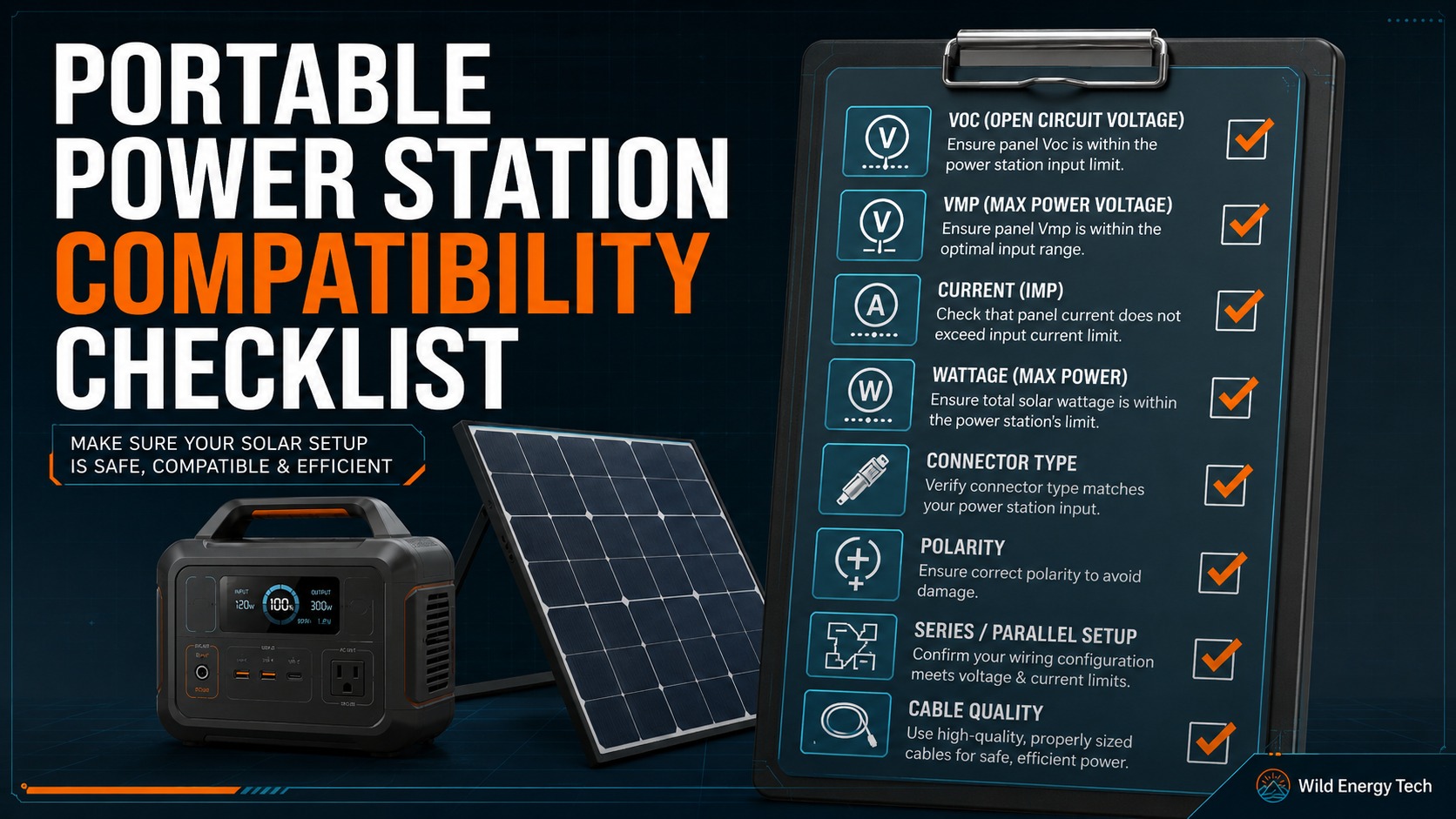
A portable power station compatibility checklist helps you avoid one of the most common solar setup mistakes: connecting equipment just because the plug fits.
Portable power station compatibility depends on more than connector shape. Before connecting a solar panel, adapter, cable or external accessory, you should check voltage, current, wattage, connector type, polarity, cable rating and the exact input limits of the power station.
This checklist gives you a practical step-by-step process for checking whether a solar panel or adapter setup is likely to be suitable for a portable power station.
Compatibility Display Case
Portable Power Station Compatibility: What Must Match?
A solar panel or adapter is only compatible with a portable power station when the voltage, current, connector type, polarity, and cable quality all match the exact model’s solar input limits. Physical connector fit alone is not enough to prove safe compatibility.
Electrical Match
Voltage & Current
- Check the panel’s Voc against the station’s maximum solar input voltage.
- Check current limits before using parallel panels.
- Remember that cold weather can raise Voc.
- Do not judge compatibility by watts alone.
Physical Match
Connector & Cable
- Confirm whether the station uses XT60, XT60i, DC barrel, Anderson, or another input.
- Check adapter polarity before connecting.
- Use cable gauge suitable for the expected current.
- Never force a connector that does not seat correctly.
Safe Compatibility Rule
- Step 1: Read the power station’s solar input limits in the official manual.
- Step 2: Compare the panel’s Voc, Vmp, current, connector type, and polarity.
- Step 3: Only connect the setup if every requirement matches the exact model.
| Check | What to verify | Why it matters |
|---|---|---|
| Voc | Below the station’s maximum solar input voltage | Exceeding voltage can damage the input circuit. |
| Current | Within the station and cable current rating | Excess current can cause heat buildup in cables or adapters. |
| Connector | Exact connector type and fit | Similar-looking plugs may not be electrically or physically correct. |
| Polarity | Positive and negative wiring | Reverse polarity can stop charging or damage equipment. |
Quick Portable Power Station Compatibility Checklist
Before connecting solar hardware, check these points:
- Exact portable power station model and generation
- Solar input voltage range
- Maximum solar input voltage
- Maximum input current
- Maximum solar input wattage
- Solar panel Voc, Vmp, Isc and Imp
- Connector type on the solar panel side
- Connector type on the power station side
- Adapter type and cable rating
- Polarity before connection
If any item is unknown, stop and check the manual or product specification before connecting the setup.
1. Confirm the Exact Power Station Model
Start by identifying the exact portable power station model. Do not rely only on the brand name. A brand may sell several models with different solar input limits, connectors and cable requirements.
For example, two units from the same brand may have different maximum solar input voltages, different current limits or different connector types.
Check the product label, manual, official product page or app to confirm the exact model and generation before buying or connecting solar hardware.
2. Find the Power Station Solar Input Limits
Next, find the solar input specification for the power station. It may be listed as solar input, DC input, PV input or MPPT input.
Write down these values:
- Minimum solar input voltage
- Maximum solar input voltage
- Maximum input current
- Maximum solar input wattage
- Required connector type
- Any required cable type, such as XT60, XT60i, DC7909, DC8020 or another connector
These values define the safe operating area for the setup. If the panel or adapter does not match these limits, do not connect it.
3. Read the Solar Panel Specification Label
The solar panel label or specification sheet should list the electrical values needed for compatibility checking.
| Panel value | Meaning | Compatibility use |
|---|---|---|
| Voc | Open-circuit voltage | Maximum voltage safety check |
| Vmp | Voltage at maximum power | Normal operating voltage check |
| Isc | Short-circuit current | Current and protection reference |
| Imp | Current at maximum power | Normal operating current check |
| Pmax | Rated maximum power | Panel wattage reference |
If the panel does not clearly list these values, avoid guessing. Use the manufacturer specification or choose a panel with complete electrical information.
4. Check Voc Before Anything Else
Voc, or open-circuit voltage, is the first number to check because it helps identify the maximum voltage risk.
Compare the solar panel Voc with the power station’s maximum solar input voltage. If the panel Voc is above the maximum input voltage, do not connect the panel.
If you are using panels in series, add the Voc values together before comparing with the power station limit. Solar panel open-circuit voltage can also rise in cold weather, so avoid building a setup too close to the maximum limit.
Related guide: Solar Panel Voc vs Vmp Explained for Portable Power Stations
5. Check Vmp Against the Input Range
Vmp is the voltage at maximum power. It helps show whether the panel’s normal operating voltage is likely to sit inside the power station’s usable solar input range.
If Vmp is below the minimum input voltage required by the power station, solar charging may not start or may be unreliable, especially in weak sunlight.
If Vmp is inside the input range and Voc is safely below the maximum voltage limit, the voltage side of compatibility is more promising.
6. Check Current Limits
After voltage, check current. The power station will have a maximum input current, and the panel will list current values such as Isc and Imp.
If the available current is higher than the power station can use, the unit may limit what it draws. However, the cables, adapters and connectors still need to be rated for the expected current in the setup.
This is especially important in parallel solar panel setups, because parallel wiring increases current while voltage stays roughly the same.
7. Check Solar Panel Wattage
Compare the solar panel wattage with the power station’s maximum solar input wattage. This helps you understand expected charging performance and whether the station may limit input.
A panel with lower wattage than the power station input limit may charge more slowly. A panel with higher wattage may be limited by the station’s maximum input rate.
Wattage alone does not prove compatibility. A panel with acceptable wattage can still be unsafe if its voltage is too high.
Related guide: Over-Paneling Portable Power Stations: What Is Safe and What Is Not
8. Check Series or Parallel Wiring
If you connect more than one solar panel, the wiring method changes voltage and current.
- Series wiring: voltage adds together, current stays roughly the same.
- Parallel wiring: current adds together, voltage stays roughly the same.
This matters because series wiring can exceed the maximum input voltage, while parallel wiring can place more current demand on cables, adapters and connectors.
Related guide: Series vs Parallel Solar Panels for Portable Power Stations
9. Identify the Connector Type
Connector type is important, but it is not the only compatibility check. Many solar panels use MC4 connectors, while portable power stations may use XT60, XT60i, DC5521, DC5525, DC7909, DC8020, Anderson-style inputs, aviation connectors or brand-specific ports.
Identify both sides of the connection:
- Solar panel output connector
- Adapter cable connector
- Power station input connector
If you are not sure which connector you have, compare it visually before buying an adapter.
Related guide: Portable Power Station Visual Connector Guide
10. Check the Adapter Cable
An adapter cable should match the connector type and the electrical requirements of the setup. A cheap or unclear adapter can create voltage drop, heat, poor contact or unreliable charging.
Check the adapter for:
- Correct connector on both ends
- Clear voltage and current rating
- Suitable cable gauge
- Good connector fit
- Outdoor suitability if used outside
- Clear polarity information
Related guide: DC Barrel Connector Guide: DC5521, DC5525, DC7909 and DC8020
11. Check Polarity Before Connecting
Polarity means positive and negative. A connector can physically fit while still being wired incorrectly for the device.
Before connecting third-party panels, adapters or extension cables, check polarity using labels, markings, manuals or a digital multimeter.
Do not assume polarity from connector shape alone.
Related guide: How to Check Solar Panel Polarity Before Connecting to a Portable Power Station
12. Inspect Cable Quality and Fit
Cable quality can affect both safety and performance. Thin wires, loose connectors, weak crimps, damaged insulation or poor-quality adapters can cause voltage drop, heat or intermittent charging.
Inspect the cable before connecting. Avoid cables that are loose, forced, damaged, overheating or sold without clear electrical ratings.
Longer cable runs also need more attention because voltage drop becomes more important as cable length increases.
Simple Compatibility Example
Imagine a portable power station accepts solar input from 12V to 30V, with a maximum input of 10A and 200W.
A solar panel has these specifications:
- Voc: 24V
- Vmp: 20V
- Imp: 8A
- Pmax: 160W
In this example, the panel voltage is inside the power station’s input range, the Voc is below the maximum input voltage, the current is below the input current limit and the wattage is within the supported range.
That suggests the electrical side may be suitable. But you still need to check connector type, adapter quality, polarity, cable rating and the exact official manual before connecting.
Compatibility Red Flags
Do not connect the setup if any of these are true:
- The solar panel Voc exceeds the power station’s maximum solar input voltage.
- You cannot find the power station solar input range.
- You cannot find the solar panel Voc, Vmp, Isc or Imp values.
- The adapter connector is loose, forced or unclear.
- The polarity is unknown.
- The cable is damaged, overheating or poorly rated.
- The seller provides only product photos and no electrical specifications.
Portable Power Station Solar Compatibility Checklist
Use this final checklist before connecting:
- Exact power station model confirmed
- Official solar input voltage range checked
- Maximum solar input voltage checked
- Maximum input current checked
- Maximum solar input wattage checked
- Solar panel Voc checked
- Solar panel Vmp checked
- Solar panel current checked
- Series or parallel wiring calculated
- Connector type identified
- Adapter rating checked
- Polarity confirmed
- Cable condition and rating checked
- Manual checked before connection
Final Recommendation
Portable power station compatibility is not decided by one number or one connector. A safe setup depends on the complete match between the power station, solar panel, adapter, cable and wiring method.
Start with voltage, especially Voc. Then check Vmp, current, wattage, connector type, adapter rating, cable quality and polarity.
If the setup passes every check and the official manual confirms the limits, it is much more likely to be suitable. If any critical value is unknown, do not connect the hardware until you can verify it.
Related Wild Energy Tech Guides
If you are checking portable power station compatibility, these related guides may also help:
How to Check if a Solar Panel Is Compatible With a Portable Power Station
Solar Panel Voc vs Vmp Explained for Portable Power Stations
Series vs Parallel Solar Panels for Portable Power Stations
Over-Paneling Portable Power Stations: What Is Safe and What Is Not