
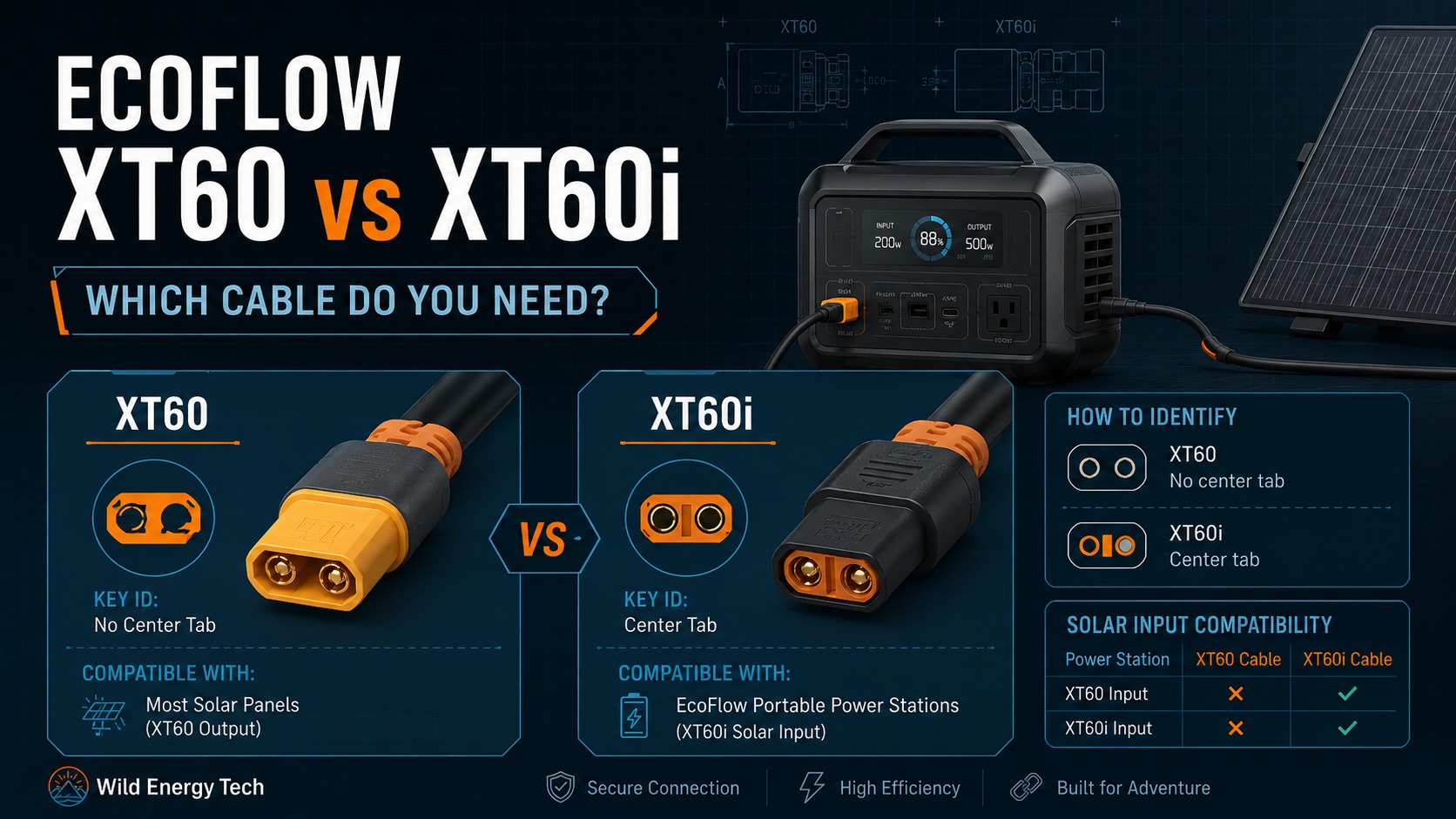
XT60 and XT60i look almost identical, but choosing the wrong cable for your EcoFlow model can limit solar input or leave the power station unable to recognise the charging source correctly.
If you choose the wrong cable, the connector may still fit, but solar charging may be limited, inconsistent or different from what you expected. This is especially important when using third-party solar panels, MC4 adapters or replacement cables.
This guide explains the difference between EcoFlow XT60 and XT60i solar charging cables, which type your model likely needs, and what to check before connecting a solar panel to your EcoFlow portable power station.
Safety note: Always check the official EcoFlow manual or specification for your exact model before connecting a solar panel or cable. Cable type matters, but voltage, current, wattage, connector quality and polarity also matter.
Quick fact: XT60 and XT60i are not identical. Both use the same two main power contacts (positive and negative). XT60i adds one extra identification contact that some power stations use to recognize the charging source. That extra contact does not raise your solar panel’s voltage or override the power station’s voltage, current or wattage limits – it only helps the unit identify what is plugged in. Model compatibility still has to be verified separately.
Quick Answer: XT60 vs XT60i for EcoFlow
The simple answer is:
- XT60 is a two-contact DC power connector used on many older or simpler solar charging cables.
- XT60i looks similar but includes an additional contact that may be used by some systems to identify the cable or charging source.
- Some EcoFlow models work best with XT60i, especially newer models listed by EcoFlow for Solar to XT60i charging cables.
- A plug that fits physically is not enough. You still need the correct cable behaviour, panel voltage, current limit and polarity.
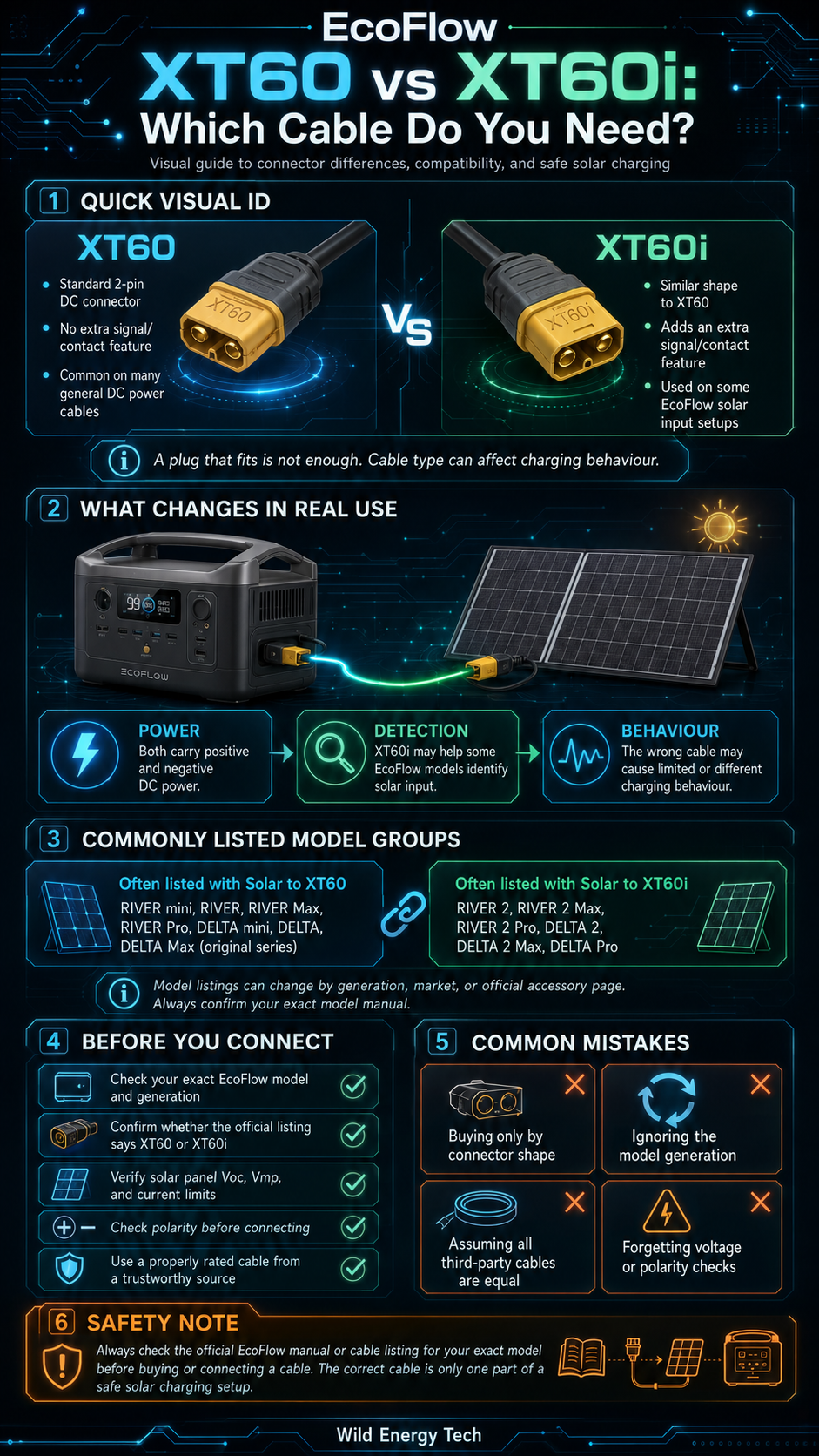
Connector Display Case
XT60 vs XT60i: What Is the Difference?
XT60 and XT60i connectors look very similar, but XT60i includes an additional signal/contact function used by some portable power stations to identify solar input correctly. On certain EcoFlow models, using the wrong cable may cause the unit to limit solar charging current. Always check the manual for your exact model before buying or connecting a cable.
Standard Connector
XT60
- Standard 2-contact DC connector.
- Common on batteries, chargers, and DC power cables.
- Does not include the extra XT60i signal/contact function.
- May be treated differently by some portable power stations.
Solar Detection Connector
XT60i
- Physically similar to XT60.
- Includes an additional signal/contact function.
- Used by some power stations to identify solar charging input.
- May help avoid current limiting on certain compatible models.
Compatibility & Safest Next Step
- Compatibility risk: The wrong connector type or wiring can cause no charging, current limiting, or unsafe operation.
- Safest action: Confirm your EcoFlow model’s specified connector type and input limits before buying.
- Before connecting: Verify voltage, current, connector type, cable quality, and polarity.
Connector shape
Why it matters: They can be confused visually.
Main contacts
Why it matters: The extra function can affect input detection.
Typical use
Why it matters: Some models expect a specific cable type.
Main risk
Why it matters: Always match the cable to the exact power station model.
XT60 and XT60i: The Short Version
XT60 is a two-contact DC connector (positive and negative) used on many solar charging cables and battery accessories. XT60i looks the same from the outside but adds a third contact that some power stations use to identify the cable or charging source. Neither connector changes how much power a cable can carry – the extra contact is for identification only.
For a full breakdown of XT60, XT60i, MC4 and other portable power station connectors, see the visual guide to XT60, XT60i, MC4, and common power-station connectors. The rest of this guide focuses on what matters for EcoFlow specifically: which models use which cable, and what to check before you buy or connect one.
EcoFlow Solar to XT60 vs Solar to XT60i Cable
EcoFlow sells both Solar to XT60 and Solar to XT60i charging cables in different markets (see the official EcoFlow Solar Charging Cable listing). The official product listings separate the two cable types and list different “works best with” model groups.
| Cable type | Typical role | Common EcoFlow listing notes |
|---|---|---|
| Solar to XT60 | Connects a solar panel to an EcoFlow unit using an XT60-style input | Often listed for older RIVER and DELTA generation models |
| Solar to XT60i | Connects a solar panel to an EcoFlow unit using an XT60i-style input | Often listed for newer RIVER 2 and DELTA 2 generation models |
Because EcoFlow’s model range changes over time, treat official product pages and model manuals as the source of truth for your exact unit.
Are XT60 and XT60i Compatible on EcoFlow Power Stations?
XT60 and XT60i can be physically compatible in some EcoFlow setups, but they are not functionally interchangeable in every case. XT60i adds an identification contact; on supported models, cable recognition can affect whether the input is treated as solar or another DC source and may affect the applied current limit. Compatibility therefore depends on the exact model, cable type, power source and documented input specification.
- Solar vs. car charging current limits: EcoFlow models can specify different maximum input currents depending on whether the source is solar or a vehicle charging circuit. For example, vehicle charging is commonly subject to a lower current limit than the compatible unit’s dedicated solar input.
- Cable recognition: On supported EcoFlow models equipped with an XT60i-style input, the charging interface can help the power station distinguish the connected charging accessory and apply the appropriate input parameters.
Verification step: Charging logic, allowable current, voltage range, and recommended cable type vary between RIVER, DELTA, and other product generations. Always check the official manual or EcoFlow accessory listing for your exact model before connecting or replacing a charging cable.
Which EcoFlow Models Need XT60 or XT60i?
EcoFlow’s own Solar Charging Cable listing states which models each cable “works best with.” The table below reproduces that grouping, corrected for two easily-confused model names (retrieved and verified on July 23, 2026):
How to read this matrix: A named cable reflects the model guidance already documented in these articles. “Check manual,” “Check guidance” or “Check input” means the exact revision, region, configuration or input path must be verified rather than inferred from the family name.
| Generation | EcoFlow model | Cable guidance | What to confirm |
|---|---|---|---|
| Original RIVER | RIVER mini | XT60 | EcoFlow cable listing; confirm the exact model label. |
| Original RIVER | RIVER | XT60 | Confirm original-generation RIVER, not a later RIVER 2 or RIVER 3 model. |
| Original RIVER | RIVER Max | XT60 | Confirm original-generation RIVER Max. |
| Original RIVER | RIVER Pro | XT60 | Confirm original-generation RIVER Pro. |
| Original RIVER | RIVER Plus | XT60 | Confirm the exact Plus model and regional listing. |
| Original RIVER | RIVER Max Plus | XT60 | Confirm the exact Max Plus model and regional listing. |
| RIVER 2 | RIVER 2 | XT60i | Confirm the full model name and the solar input instructions in its manual. |
| RIVER 2 | RIVER 2 Max | XT60i | Confirm the full model name and the solar input instructions in its manual. |
| RIVER 2 | RIVER 2 Pro | XT60i | Confirm the full model name and the solar input instructions in its manual. |
| RIVER 3 | RIVER 3 | Check manual | This model was not in the official cable list checked for the earlier rows. Confirm the regional variant, solar-input diagram and supplied documentation. |
| RIVER 3 | RIVER 3 Plus | Check manual | Confirm the exact Plus revision, regional variant and the connector shown in its manual. |
| RIVER 3 | RIVER 3 Max / Max Plus | Check manual | These configurations may combine a main power station with an expansion battery. Use the main station manual and confirm the exact configuration. |
| Original DELTA | DELTA mini | XT60 | EcoFlow cable listing; confirm the exact model label. |
| Original DELTA | DELTA | XT60 | Confirm original-generation DELTA, not a later DELTA 2 or DELTA 3 model. |
| DELTA Max | DELTA Max (1600) | XT60 | Do not confuse this capacity variant with DELTA Max (2000). |
| DELTA Max | DELTA Max (2000) | XT60i | Do not confuse this capacity variant with DELTA Max (1600). |
| DELTA 2 | DELTA 2 | XT60i | Confirm the full model name and the solar input instructions in its manual. |
| DELTA 2 | DELTA 2 Max | Check manual | This is a different product line from DELTA Max (2000). Confirm the exact regional model and input limits. |
| DELTA Pro | DELTA Pro | XT60i | Confirm the correct solar input path and the model manual. |
| DELTA 3 | DELTA 3 | Check manual | Confirm the exact DELTA 3 revision, regional variant and documented input path. |
| DELTA 3 | DELTA 3 Plus | Check manual | Confirm the exact Plus revision, regional variant and documented input path. |
| DELTA 3 | DELTA 3 Classic | Check manual | Confirm the Classic model documentation rather than assuming it matches another DELTA 3 variant. |
| DELTA 3 | DELTA 3 1500 | Check manual | Confirm the exact 1500 model, regional variant and documented input path. |
| DELTA Pro | DELTA Pro 3 | Check guidance | Use the current EcoFlow guidance for the exact model and intended solar input path. |
| DELTA Pro | DELTA Pro Ultra | Check input | This system has multiple possible input paths. Confirm the specific input, component configuration and official instructions before selecting a cable. |
Important: Check the complete model name, revision and regional documentation. For an expansion-battery configuration, follow the main power station’s input instructions. On models with more than one input path, confirm the specific port being used before choosing a cable.
EcoFlow model names, capacities and regional listings change over time, and this table can go out of date. Before buying, confirm your exact model label (including the capacity shown in parentheses, where EcoFlow lists one) against the current official cable listing or your model’s manual, not against a model’s general family name alone. For the complete, regularly-updated model-by-model list, see the complete EcoFlow model-by-model connector list.
Need the right EcoFlow solar charging cable?
Choose the connector your model requires, then check the official EcoFlow cable option before ordering.
Affiliate disclosure: The links below are affiliate links. If you buy through them, I may earn a commission at no extra cost to you.
Simplified connector spec
2 main contacts: positive (+) and negative (−). No identification contact.
Official EcoFlow XT60 Solar Charging Cable
For EcoFlow models that use the standard 2-contact XT60 solar input.
Check the Official XT60 CableSimplified connector spec
2 main contacts: positive (+) and negative (−), plus 1 identification contact. The identification contact does not carry extra charging power.
Official EcoFlow XT60i Solar Charging Cable
For compatible EcoFlow models that use the 3-contact XT60i solar input, with its extra signal pin.
Check the Official XT60i CableConfirm your exact EcoFlow model, input label, connector type, and official manual before ordering.
Why XT60i Can Affect Solar Charging Behaviour
XT60i Input Port and Sense Contact: What It Does and What You Should Verify
The primary functional distinction between a standard two-contact XT60 connector and XT60i is the additional center identification contact used on the XT60i interface.
- Source and current recognition: On supported EcoFlow power stations, the XT60i interface can help distinguish between dedicated solar charging accessories and vehicle charging accessories.
- Model-specific current ceilings: The current available from a supported solar charging setup depends on the exact power station’s published solar-input specification. It should not be assumed from the connector alone.
- Varying specifications: Input voltage ranges, maximum wattage, recommended cable type, and current limits differ between models such as DELTA and RIVER generations.
Important safety notice: Do not bridge contacts or make DIY modifications to an XT60i connector in an attempt to change charging behaviour. Use the manufacturer-specified solar or vehicle charging cable for the exact power station model.
Community reports (for example, on DIY solar forums) describe some EcoFlow models checking whether the XT60i identification contact is connected in a specific way before treating the input as solar rather than another DC source; when it is not, some users report the unit falling back to a lower current limit, often cited as around 8A. EcoFlow does not appear to publish the exact detection logic in its public cable or manual documentation, so treat this as a plausible explanation from user reports rather than a confirmed EcoFlow specification.
Because behaviour can vary by model and firmware, avoid treating forum advice as universal. Use it as a clue, then confirm with the official manual or EcoFlow support for your exact model.
If your EcoFlow unit seems limited to a low current on solar input, see the full EcoFlow 8A solar-input troubleshooting guide for the complete diagnostic sequence.
Documented vs. Community-Reported Information
This guide draws on a few different kinds of sources, and it is worth knowing which is which:
- Official EcoFlow compatibility listings: which model works with which cable, as published on EcoFlow’s own product pages.
- Connector-manufacturer specifications: physical facts about XT60/XT60i, such as contact count and current rating, from connector manufacturers and their distributors.
- General electrical principles: voltage, current, wattage and polarity rules that apply regardless of connector type.
- Community-reported charging behaviour: patterns described by EcoFlow users, such as the 8A behaviour above, that are plausible but not confirmed in EcoFlow’s own public documentation.
Where this article states something from the last category, it says so directly rather than presenting it as an official EcoFlow specification.
Why a Fitting Plug Is Not Enough
A normal XT60 plug and an XT60i-style port may appear physically compatible in some setups. That does not mean the cable is the correct solar charging cable for the power station.
Compatibility depends on several factors:
- Correct XT60 or XT60i cable type for the EcoFlow model
- Solar panel open-circuit voltage
- Power station maximum solar input voltage
- Maximum input current
- Solar panel wattage
- Adapter quality and wire gauge
- Correct polarity
If any of these are wrong, the setup may underperform or may not be safe even if the connector fits.
Example: Why the Right Connector Still Is Not Enough
Here is a simplified, hypothetical example, not a real test, showing why the connector type is only one part of the picture:
- Suppose a solar panel has a hypothetical open-circuit voltage (Voc) of 24V at typical temperature.
- Suppose the EcoFlow model’s manual lists a maximum solar input voltage of 23V.
- Even with exactly the correct XT60 or XT60i cable, this panel’s Voc already exceeds the unit’s input limit before any current even flows.
- Cold weather can raise a panel’s Voc further above its rated figure, which can push a borderline panel over the limit even if it seemed fine on a warmer day.
This is why the right cable type is necessary but not sufficient. Always check the exact Voc printed on your panel’s label and the maximum solar input voltage in your EcoFlow model’s manual, and leave margin for cold-weather voltage increases, before connecting.
Using Third-Party Solar Panels With EcoFlow
Many users connect third-party solar panels to EcoFlow power stations. This can work when the panel and cable match the EcoFlow input requirements, but it should not be guessed.
When using a third-party panel, check:
- Panel Voc is below the EcoFlow model’s maximum solar input voltage.
- Panel Vmp is inside the usable input voltage range.
- Panel current and wattage are suitable for the unit.
- The panel side connector, usually MC4, matches the adapter cable correctly.
- The power station side uses the correct XT60 or XT60i cable type.
- Polarity is correct before connecting.
Related guide: How to Check if a Solar Panel Is Compatible With a Portable Power Station
How to Choose the Right EcoFlow Solar Cable
Use this order before buying or connecting a cable:
- Find your exact EcoFlow model name and generation.
- Check the official manual or EcoFlow product page for the required solar input cable.
- Confirm whether the model expects XT60 or XT60i.
- Check the solar panel’s Voc, Vmp, current and wattage.
- Check whether the panel uses MC4 or another connector.
- Use a cable with clear specifications and suitable wire quality.
- Check polarity before connecting third-party hardware.
If the cable listing does not clearly say whether it is XT60 or XT60i, avoid guessing.
Common EcoFlow XT60 and XT60i Mistakes
Avoid these common mistakes when choosing an EcoFlow solar charging cable.
Buying only by connector shape
XT60 and XT60i can look similar. Do not buy only by shape. Check the cable type and model compatibility.
Ignoring the EcoFlow model generation
Older and newer EcoFlow models may have different recommended cable types. Always check the exact model, not just the DELTA or RIVER family name.
Assuming all third-party XT60i cables are equal
Third-party cables can vary in wiring, wire gauge, connector quality and specifications. Use properly rated cables from trustworthy sellers.
Forgetting the panel voltage
The correct cable does not make an incompatible solar panel safe. Always check Voc and the power station’s maximum solar input voltage.
Forgetting polarity
Mixed-brand panels and adapters should be checked for polarity before connection. A fitting connector does not prove correct wiring.
When You Should Not Connect the Cable
Do not connect the solar panel to your EcoFlow power station if any of these are true:
- You do not know whether your model requires XT60 or XT60i.
- The solar panel Voc exceeds the EcoFlow model’s maximum solar input voltage.
- The cable listing does not clearly state the cable type or rating.
- The connector is loose, forced, damaged or overheating.
- The polarity is unknown.
- You are relying only on a product photo to identify the connector.
Final Recommendation
When choosing between EcoFlow XT60 and XT60i, start with the exact EcoFlow model, not the connector shape. Check the official manual or product listing to confirm whether the unit works best with Solar to XT60 or Solar to XT60i.
If your model expects XT60i, a normal XT60 cable may not behave the same way even if it fits. If your model is listed for XT60, do not assume an XT60i cable is required unless the manual or official support confirms it.
After choosing the cable type, still check solar panel voltage, current, wattage, polarity and cable quality. The right cable is only one part of a safe solar charging setup.
Sources and Methodology
This guide is based on EcoFlow’s official product and cable listings, publicly available connector-manufacturer specifications, and cross-checking of model names across EcoFlow’s own pages. Model compatibility information was last verified directly against EcoFlow’s Solar Charging Cable listing on July 23, 2026. Community-reported charging behaviour is identified as such throughout this article and is not presented as an official EcoFlow specification. This article is editorial analysis based on documentation research; it does not involve hands-on testing, product ownership, or independent electrical measurements.
Related Guides
Related Wild Energy Tech Guides
If you are choosing between XT60 and XT60i, these guides cover the rest of the setup: the complete model list, connector identification, solar-input troubleshooting, voltage limits, polarity, and adapter safety.
Model List
Complete EcoFlow Model List
The full, regularly-updated model-by-model breakdown of XT60 vs XT60i.
Troubleshooting
EcoFlow Solar Charging Stuck at 8A
Understand why some EcoFlow setups may limit solar input and what to check first.
Connector Guide
MC4 to XT60i vs XT60
See how solar panel MC4 leads connect to XT60 or XT60i power station inputs.
Checklist
Compatibility Checklist
Check voltage, current, connector type, polarity, and cable quality before connecting.
Voltage Limits
Solar Panel Voc vs Vmp
Learn which voltage number matters for safety and which one describes normal operation.
Safety Check
How to Check Solar Panel Polarity
Verify positive and negative wiring before using third-party solar panels or adapters.
Connector Basics
Visual Connector Guide
A broader look at XT60, XT60i, MC4 and other common power-station connectors.
Panel Compatibility
Is Your Solar Panel Compatible?
A general checklist for matching a solar panel to a portable power station.
Hardware Vault
Solar Adapters & Connector Hub
Explore connector types, adapter risks, cable checks, and related hardware guides.